 English
  Russian
  Spanish
  French
  German
Blog

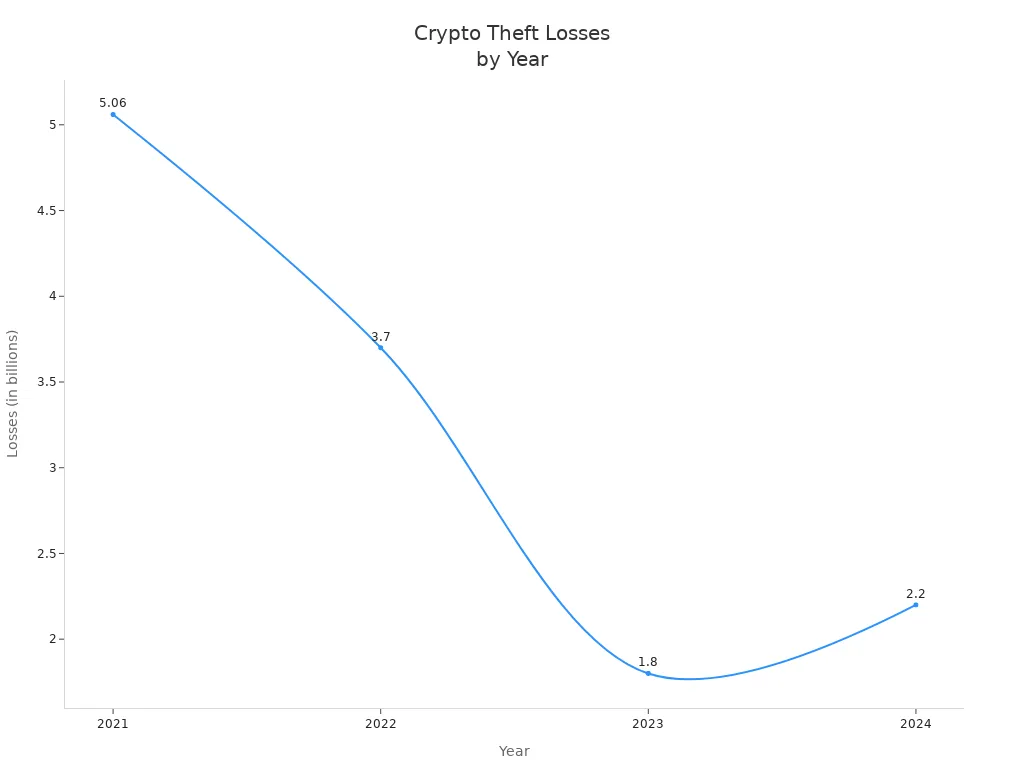
Many people are concerned about keeping their cryptocurrency safe and private, especially with the ongoing risks of scams and thefts. The table below highlights just how risky digital assets can be. Strong protection is essential for securing your Cryptowallet and safeguarding your cryptocurrency. Using a reliable Cryptominer or a trusted Cryptowallet can make your digital assets much safer.
Secure Wallets and Private Keys
Choosing a Cryptowallet
Picking the right wallet is very important for safety. There are many types of crypto wallets. Some are safer than others. Look at the table below to see the differences:
Feature | Hot Wallets | Cold Wallets (Primarily Hardware) |
|---|---|---|
Connectivity | Always online | Offline (connected only when needed) |
Security | Lower (vulnerable to online threats) | Higher (immune to online threats) |
Convenience | High (easy and quick for transactions) | Lower (more steps for transactions) |
Primary Use Case | Frequent trading, small amounts | Long-term holding, large amounts |
Cost | Often free (software) | Purchase cost for hardware devices |
Accessibility | Desktop, mobile, web | Physical device needed |
Private Key Storage | On internet-connected device | Offline, on a secure device |
Risk of Loss | Hacking, malware, phishing | Physical loss, forgotten PIN/seed |
Examples | MetaMask, Trust Wallet | Ledger, Trezor |
Private keys are your sole access to crypto—whoever obtains them controls your funds. To secure them effectively:
- Prioritize offline storage.
- Back up seed phrases physically.
- Never share keys or seed phrases
Store Private Keys Safely
Private keys let you use your cryptocurrency. Keeping private keys offline makes them safer. Cold wallets keep private keys off the internet. This stops hackers, phishing, and malware from stealing them. Hardware wallets have special chips that lock private keys. If someone tries to break in, the data gets erased. This makes it very hard for hackers to steal your private keys.
Tip: Write your recovery words on paper or metal. Keep them in a safe place, like a locked box. Do not save recovery words online.
Never Share Your Keys
Do not give your private keys to anyone. If you share private keys, your wallet is not safe. Saving private keys online can lead to hacking or malware. Keeping them offline is safer, but you must not lose them. If you lose your recovery words, you can lose your crypto. Always keep your private keys secret and safe.
Enable 2FA and Strong Passwords
Two-Factor Authentication for Cryptocurrency
Two-factor authentication gives your account extra safety. It asks for another step after your password. Most wallets and exchanges have this feature. You can set up 2FA with an app or a hardware token. After you connect the app, you enter a code each time you log in. This makes it much harder for hackers to get in, even if they know your password. Experts say not to use SMS-based 2FA because it is not as safe.
Advantage | Description |
|---|---|
Accounts are safer with more than just a password. There is a second layer of defense. | |
Reduced Risk of Hacks and Breaches | Stops people from getting in, even if they have your login info. |
Peace of Mind | You can feel safer when trading and investing. There is an important layer of protection. |
Create Strong, Unique Passwords
Hackers try many ways to guess weak passwords. They use brute force, dictionary attacks, and phishing. Make passwords at least 14 characters long. Use letters, numbers, and symbols in your password. Do not use your name or easy words. Every account should have its own password. Password managers help you make and keep strong passwords.
Protect Your Digital Assets
Change your passwords often. Never share your passwords or 2FA codes. Check your security often to find weak spots. Using strong passwords and 2FA together keeps your digital assets safer.
Keep Software and Devices Updated
Update Cryptowallet Apps
If you use old cryptowallet apps, you face more risks. Hackers like to attack old versions because they know their weak spots. Updates help fix these problems and add new safety tools. Open-source wallets are good because anyone can look at the code for problems. If you skip updates or do not watch your transactions, you could lose money.
Old or untrusted wallet software lets hackers use known tricks.
Updating often and using open-source wallets with clear code checks is very important for safety.
Not watching your transactions can make you lose a lot of money.
Tip: Stay safe by updating often. Always check for the newest version before you use your wallet app.
Secure Your Devices
Malware can steal your private keys and passwords. Devices that go online need strong safety. Put antivirus programs on your devices and scan for bad stuff often. Turn on firewalls to stop unwanted people from getting in. Do not download strange files or click on weird links. Malware can hide in fake apps or websites. Even safe devices can become unsafe if malware gets in. Restart your device after updates so changes work.
Use Trusted Sources
Only get cryptowallet and safety software from real websites. Trusted places help stop malware from getting in.
Only get software from trusted places and real websites.
Look at user reviews and developer ratings first.
Think about using cold wallets that stay offline for better safety.
Fake websites often spread malware to people who use cryptocurrency. Reading reviews and checking ratings helps you stay away from bad downloads. Cold wallets are safer because they are not online.
Avoid Scams and Phishing
Recognize Cryptocurrency Scams
Scammers look for people who own digital assets. They use tricks to steal money from others. In one year, losses from cryptocurrency fraud grew by 53%. The total loss reached $3.96 billion. Many scams begin on social media, ads, or email. Scammers try to build trust for weeks before asking for money. They offer fake investment chances. Sometimes, victims see fast returns at first. This makes them want to invest more money. Then, the scammer disappears with all the money.
Common scams include:
Pig butchering scams that cause big money loss.
Investment scams, which are over 80% of cases reported to the Better Business Bureau.
Scammers reach out to people on social media and email.
Most victims lose about $5,000.
Tip: Always check if an investment is real. Never trust strangers online.
Spot Phishing Attempts
Phishing tricks people into giving away private information. In 2024, phishing was 31% of all attacks. Attackers use social media like Telegram and Discord. They pretend to be real investment services or wallet companies.
Phishing tricks include:
Fake websites that ask for private keys or seed phrases.
Bad smart contracts and wallet drainer scams.
Tricking people with misleading messages.
Malware hidden in browser add-ons or fake apps.
A recent case showed a user lost $908,000 after signing a fake approval. Attackers did not steal private keys. They used trust and tricked the user.
Safe Communication
Fake messages often have warning signs. People may get fake subpoenas or law enforcement contact. Other signs are account freezes or blockchain analysis activity. You might also get third-party alerts or extra financial checks.
To stay safe:
Use secure ways to talk to others.
Never share sensitive information with strangers.
Watch out for malware in messages or files.
Note: Good security habits help keep digital assets safe from scams and malware.
Backup and Recovery for Digital Assets
Backup Your Cryptowallet
Backing up your cryptowallet keeps your digital assets safe. You should make a backup of your private keys and recovery phrases. Cold wallets are very safe, but losing them without a backup means you lose your cryptocurrency forever. To stop this from happening, you should:
Write down your seed phrase when you set up your wallet.
Keep the backup in a safe and private place.
Use an external hard drive or an encrypted USB to save important backups.
Register your hardware wallet for recovery services if you can.
It is important to test your backup. Try to restore your wallet once a year. This makes sure your backup works and helps you avoid losing money if your device breaks.
Store Recovery Phrases Offline
A recovery phrase lets you get your digital assets back. Keeping it offline protects it from hackers and malware. Write your recovery phrase on paper or a metal plate. Put it in a locked box or a safety deposit box. Never keep your recovery phrase on cloud services or online devices. Hackers can use malware to find recovery phrases in files or pictures. One person lost over $655,000 because hackers found a seed phrase in an iCloud backup. Storing your recovery phrase offline stops this from happening.
Tip: Make more than one backup of your recovery phrase and put them in different safe places.
Plan for Device Loss
Anyone can lose a device. Having a recovery plan helps keep your digital assets safe. You should:
Get ready for loss by keeping backup devices or other ways to get in.
Tell a trusted family member how to find your recovery information if there is an emergency.
Move your assets quickly if your device is lost or stolen.
A good plan lowers the chance of losing your assets forever and helps you get them back fast. Check and update your plan often to keep your security strong.
Consider Cryptominer Security Solutions
Professional Mining and Asset Protection
For users engaged in crypto mining, professional cryptominer services add an extra layer of security beyond basic asset protection. These services use robust measures like 24/7 equipment monitoring, biometric access controls, video surveillance, and secure network systems to safeguard mining hardware and linked crypto wallets.
Conclusion: Start Proactively Securing Your Cryptocurrency Today
FAQ
What should I do if I lose access to my crypto wallet?
Use your recovery phrase to regain access. Ensure the phrase is stored offline (e.g., physical paper/metal) to avoid permanent asset loss.
How often should users update their wallet software for better security?
Users should check for updates monthly. Regular updates patch known vulnerabilities and shield against new threats.
Can stolen cryptocurrency be recovered?
Rarely. Report the theft to authorities immediately, but expect low chances of retrieving lost funds.