First, How to Create a Ticket?
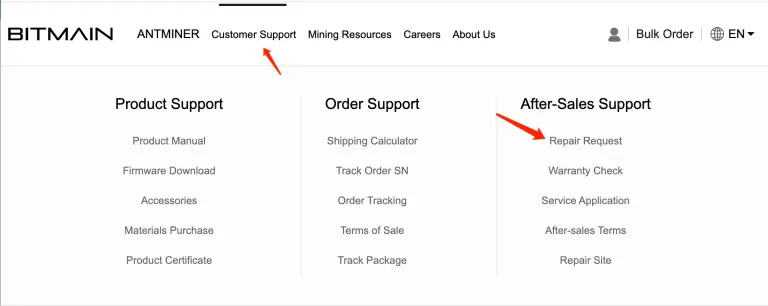
Visit the official BITMAIN website (www.bitmain.com), click on “customer support” at the top of the page, and select “repair request”.
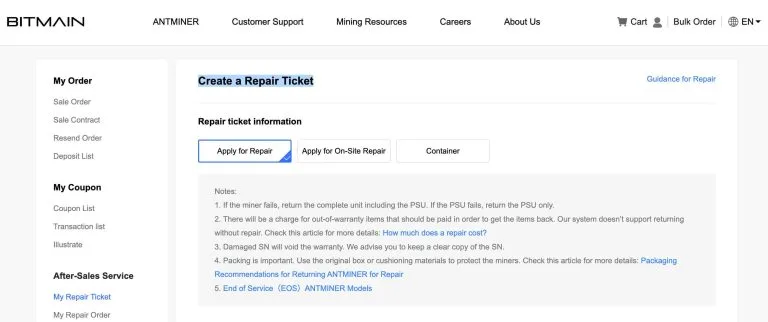
At this time, if you have an account, the system will remind you to log in. If you do not have an account, you can register directly and then enter the “Create a Repair Ticket” interface.
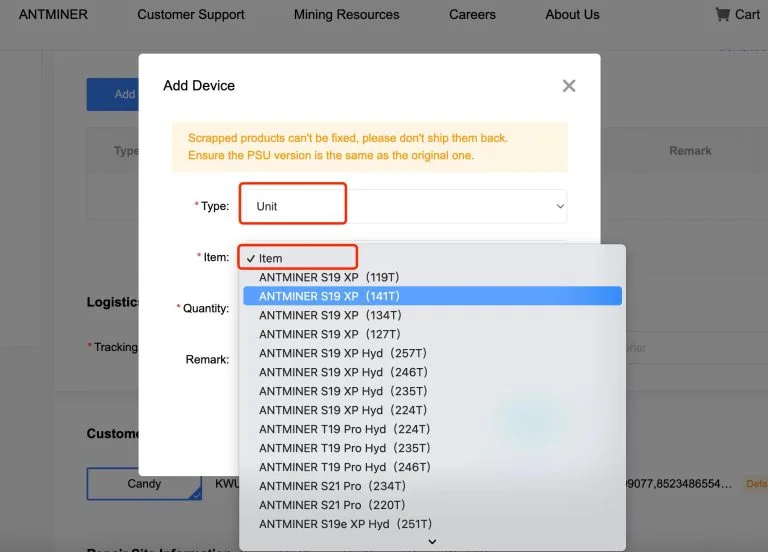
Then you need to add information about the machine you need to repair:
Please fill in the correct courier company and correct tracking number in “Logistics information”
When filling in the tracking number, we should pay attention to three points:
- ⚠ First, the tracking number can only be filled in once. Be sure to fill in the correct waybill number, if you don’t have the correct waybill number, you can put today’s date and time plus some random letters in front
- ⚠ Second, update the actual tracking number in the repair ticket within 7 days of the repair ticket being created. Otherwise, the tracking number cannot be updated after the above 7 days.
- ⚠ Third, the BITMAIN repair department must receive the defective product within 15 days after the creation of the ticket otherwise, if the product is received after the that period, the warranty period of the product cannot be fulfilled.
Fill in your address information in “customer information”:
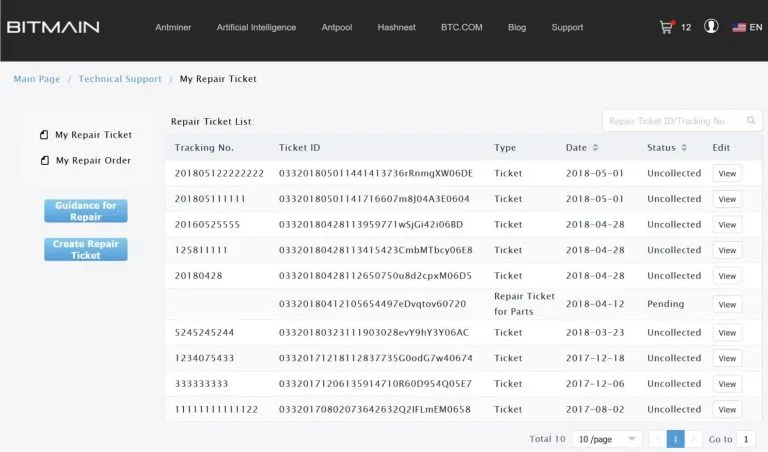
After submission, if you see the following interface, it means that you have successfully created a ticket. The status of the ticket should be “uncollected”
If by any chance the information you submitted is incorrect (the submitted machine information needs to be modified, or your receiving address needs to be changed), you can click “View—Edit” and modify your corresponding information.
Note: BITMAIN may reject packages under the following circumstances:
- No repair ticket is created on the official website;
- The physical object does not match the ticket (BITMAIN cannot distinguish whether it is a ticket creation error or a logistics and transportation problem);
- Ticket creation error (for MAWB and HAWB, you need to use MAWB to create a ticket ;
- The customer has not paid the freight or the repair fee
- The product is improperly packaged when received, or the packaging surface is severely damaged. All resulting losses (including repair costs, loss of income, etc.) shall be borne by the customer.
Second, How to Check the Status of Your Repair Ticket.
After-sales repair ticket status description,The terminology is explained as follows:
- Goods to be received: The system displays “goods to be received” before signing for logistics.
- Goods received: in repairing.
- Quote: You will get a quotation via email after the repair is finished.
- Paid: After the payment is confirmed, it will be displayed as paid, and the machine quotation during the warranty period will be displayed as 0.
- Completed: Machine Return Completed
Third, Notes On The Machine Return To The Factory For Repair
- For machines or parts returned to the factory for repair, we need to ensure that the packaging is effectively protective and meets transportation requirements. If the product is damaged during transportation due to improper packaging, the cost will be borne by the sender
- Please do not assemble defective parts of multiple mining machines into one mining machine for repair. This will not only increase the difficulty and cost of repair but also make the assembled machine more susceptible to damage, causing losses to users.
- Please pay the freight for the return package in advance, otherwise, BITMAIN will refuse to accept the package

 English
  Russian
  Spanish
  French
  German