Inhaltsverzeichnis
- Introduction: Why Mine Zcash (ZEC) in 2025?
- The Antminer Z15: Your Equihash Powerhouse
- What You’ll Need Before You Start
- Step-by-Step Setup Guide for Your Antminer Z15
- Monitoring Your Miner and Viewing Rewards
- Profitability Analysis and Key Considerations for 2025
- Essential Tips for Stable and Long-Term Operation
- Conclusion: Is the Z15 a Smart Mining Choice?
Introduction: Why Mine Zcash (ZEC) in 2025?
Zcash (ZEC) remains one of the most innovative privacy-focused cryptocurrencies in the blockchain space. Launched in 2016, it solves a key limitation of early digital currencies—mandatory transparency—by allowing users to opt for either private or public transactions using advanced Zero-Knowledge-Beweise called zk-SNARKs.
For miners, Zcash’s Equihash algorithm provides a specialized opportunity for ASIC hardware such as the Antminer Z15. If you want to better understand Equihash’s design, you may review the original Equihash research paper.
ZEC saw a strong resurgence in 2024–2025 as privacy discussions returned to the spotlight. This guide will show you how to configure the Antminer Z15 for Zcash mining and start earning network rewards.
The Antminer Z15: Your Equihash Powerhouse
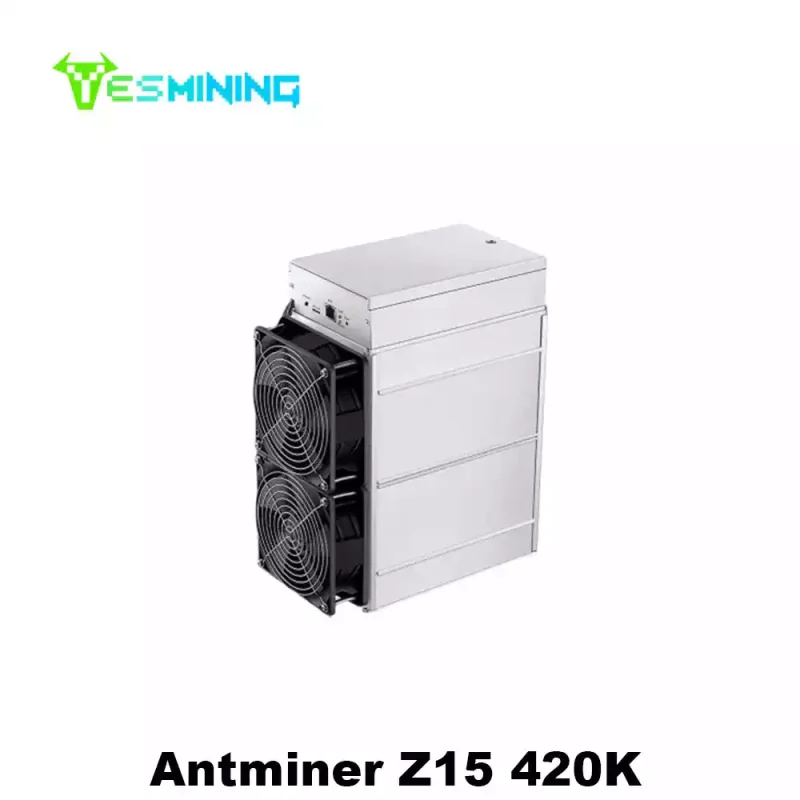
Der Bitmain Antminer Z15 is a dedicated, high-performance ASIC miner designed exclusively for the memory-hard Equihash algorithm. It strikes an excellent balance between power, efficiency, and stability, making it a top choice for both home miners and small-scale operations.
Here are its core technical specifications:
| Spezifikation | Details |
|---|
| Hashrate | 420 kSol/s (kilo-solutions per second) |
| Stromverbrauch | 1510W |
| Energieeffizienz | Approximately 3.6 J/kSol |
| Algorithmus | Equihash (supports ZEC, ZEN) |
| Geräuschpegel | Relatively low for an ASIC, suitable for environments where noise is a consideration. |
| Kühlung | Intelligent cooling system with temperature-adjusting fans. |
Compared to its more powerful sibling, the Z15 Pro (840 kSol/s), the Z15 offers a more accessible entry point with lower power draw and is often praised for its reliable, steady output.
What You’ll Need Before You Start
To begin mining ZEC with your Antminer Z15, ensure you have the following:
- Antminer Z15 Unit: The miner itself, including its power supply cords.
- Stable Power Supply: A dedicated 220V circuit is strongly recommended to handle the 1510W load safely and stably.
- Ethernet Connection: A wired internet connection is mandatory for reliable communication with the mining pool.
- ZEC Wallet Address: This is where your mining rewards will be sent. You can obtain one from a supporting exchange (e.g., Binance, OKX) or use a private wallet like the official Zcash wallet or Trust Wallet. Important: Always use a wallet you control for long-term storage.
- Mining Pool Account: Solo mining ZEC is virtually impossible. You must join a pool. This guide will use generic pool settings, but you need to register with a pool like f2pool, Kryptex, or another reputable ZEC pool and create a “worker”.
If you’re still unsure which mining pool to choose, check out our mining profitability guide. It walks you through how to calculate your real payback period and understand the impact of difficulty changes.
Step-by-Step Setup Guide for Your Antminer Z15
Step 1: Unboxing and Hardware Connections
Place your miner in a cool, dry, and well-ventilated area. Ideal ambient temperature is between 25–30°C (77–86°F) with humidity below 65%.
- Connect the three PCIe 12V power cables to the main hash boards.
- Connect the additional PCIe 12V cable to the control board.
- Plug the power supply unit into a 220V outlet.
- Connect an Ethernet cable from your router to the “ETH” port on the miner.
Step 2: Locating Your Miner on the Network
Your miner needs an IP address to communicate. Find it using one of these methods:
- Use the Bitmain IP Reporter Tool (available from Bitmain’s website).
- Check the DHCP client list in your home/router’s administration interface.
The miner and your computer must be on the same local network for this step.
Step 3: Accessing the Control Panel
- Open a web browser (like Chrome) on a computer connected to the same network.
- Enter the miner’s IP address into the browser’s address bar and press Enter.
- The login page for the miner’s backend will appear. The default credentials are:
- Username:
root - Passwort:
root
- Immediately change the default password after your first login for security.
Step 4: Configuring for a Mining Pool
This is the most critical step. Navigate to the “Miner Configuration” or “Settings” tab. You will see fields for at least three pools (for redundancy). Configure Pool 1 as follows:
| Feld | What to Enter | Beispiel |
|---|
| URL/ Pool | The stratum address of your chosen mining pool. | stratum+tcp://zec.f2pool.com:3357 |
| Worker/ User | Your pool username and worker name, usually in the format PoolUsername.WorkerName. | miner2025.z15_01 |
| Passwort | Can usually be set to x or 123. | x |
Copy these same settings to Pool 2 and Pool 3 for backup.
Step 5: Optimizing Settings and Starting the Miner
Before saving, it’s good practice to set a temperature safety limit.
- Navigate to advanced settings and locate the fan and temperature controls.
- Set a shutdown threshold for the chip temperature (e.g., 110°C) to prevent hardware damage.
- Click “Save & Apply” or equivalent. The miner will restart and begin hashing within 1-2 minutes.
Monitoring Your Miner and Viewing Rewards
After 15-20 minutes, your miner should submit its first share to the pool.
- Local Monitoring: Monitor status directly from its web interface (hashrate, temperature, errors).
- Poolside Monitoring: Log in to your mining pool’s website to see live hashrate, estimated earnings, and payout stats.
- Mobile Monitoring: Many pools offer mobile apps for on-the-go monitoring.
Profitability Analysis and Key Considerations for 2025
Mining profitability is dynamic and depends on three key variables: ZEC price, network difficulty, and your electricity cost.
Current Context: As of late 2025, ZEC network mining difficulty has risen significantly and is approaching historical highs, a natural response to increased price and miner interest. This means the same hardware earns less ZEC over time if difficulty rises and price stays flat.
Critical Risk – “Hardware-Price Scissors”: Be aware of a common cycle in PoW mining. Exceptionally short calculated ROI periods can attract a flood of new hashpower. When this new capacity comes online months later, it can cause network difficulty to surge just as early promoters may sell, leading to a potential “double squeeze” of lower coin price and lower mining rewards. Invest with a long-term perspective.
Essential Tips for Stable and Long-Term Operation
- Environment is Key: Maintain good airflow. Never operate in a sealed, dusty, or hot space.
- Stable Voltage: Use a quality power strip and ensure stable voltage supply.
- Regular Maintenance: Periodically clean dust from the fans and heatsinks.
- Stay Updated: Check Bitmain’s official support page for firmware updates.
Conclusion: Is the Z15 a Smart Mining Choice?
The Antminer Z15 is a proven, efficient, and reliable workhorse for mining Zcash. Its lower noise and power consumption compared to top-tier models make it an excellent choice for entry-level and intermediate miners with modest electrical costs.
Successful mining in 2025 requires more than just setting up hardware. It demands ongoing management, a clear understanding of market cycles, and careful calculation of operational costs against potential rewards. By following this guide, you have established a solid technical foundation. Remember to continuously monitor network conditions and market trends to make informed decisions.
Haftungsausschluss: Cryptocurrency mining involves significant risk, including capital loss, operational costs, and market volatility. This article is for educational purposes only and is not financial advice. Always conduct your own thorough research before investing in mining hardware.

 German
  English
  Russian
  Spanish
  French